
Homework you can track
Deadlines, completion and overdue work in one place.
 FOR SCHOOLS
BUILT FOR PHYSICS DEPARTMENTS
A bold claim. Here’s the working.
Set physics homework, track every pupil’s progress and see where support is needed next. One workspace for your department, from quick checks to complete mocks.
Built by a UK physics teacher and examiner.
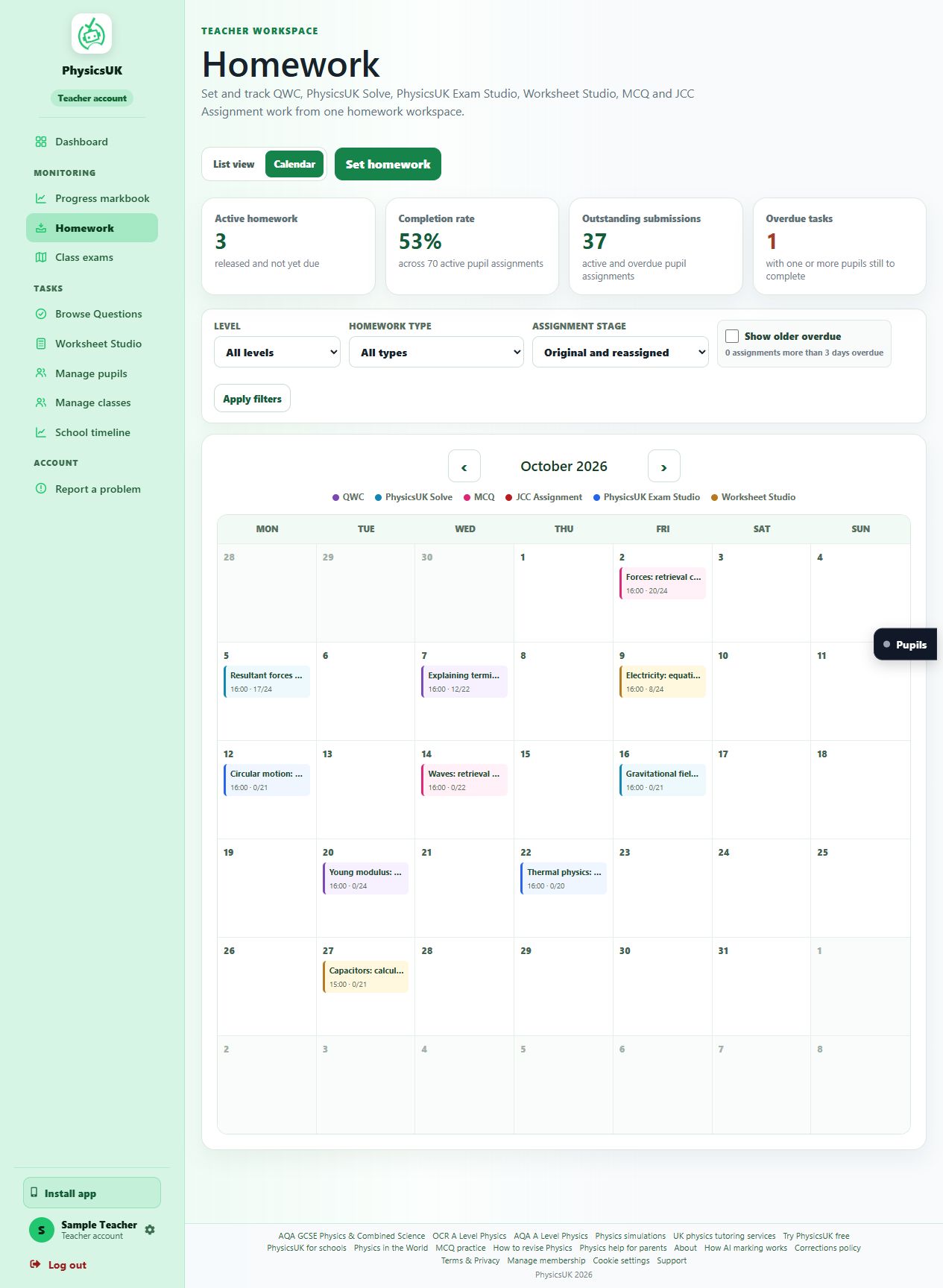
Deadlines, completion and overdue work in one place.
Review answers, attempts and the feedback pupils received.
Homework analysis reveals shared gaps and useful next steps.
A WORKSPACE FOR THE WHOLE HOMEWORK CYCLE
Move between a calendar and a task list. See deadlines, completion totals and outstanding submissions, then open the results for the pupils who need a follow-up.
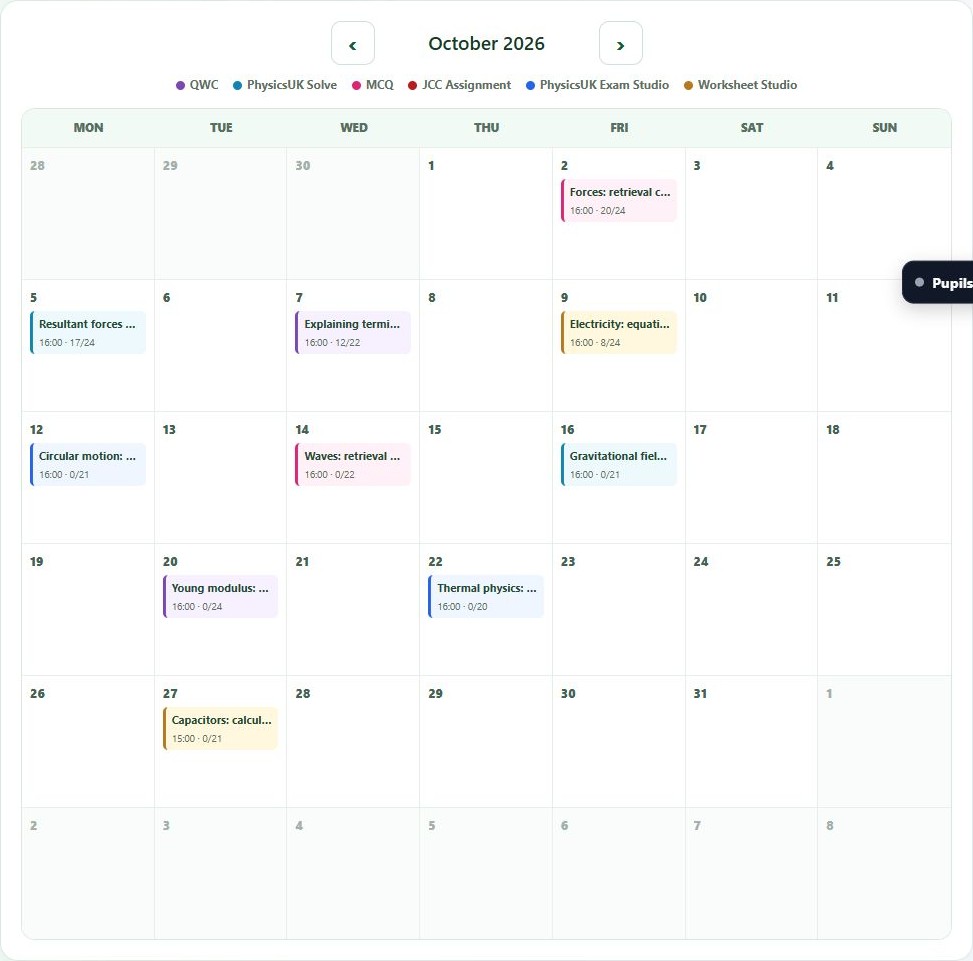
Colour-coded homework types and dated tasks make the schedule easy to scan. Switch to the list for a closer look.
See how many pupils have completed each task, alongside active homework and outstanding submissions.
Open the homework markbook to review results, send a reminder or adjust a pupil’s deadline.
HOMEWORK AND PUPIL TRACKING
Track completion, review the pupil’s working and monitor progress over time. Use the evidence to choose the next task.
Explore it with your department Evidence to support your professional judgement.Per-pupil status, completion dates and attempt history help you distinguish missing work from submitted work awaiting feedback.
Open saved answers and feedback. See whether a pupil needs help with the physics, the calculation or how they communicate their reasoning.
Use the teacher dashboard and progress markbook to review activity, topic performance and understanding of individual specification points.
Choose a score threshold for reassignment, include missing or late work where appropriate, and review earlier attempts alongside the follow-up result.
FROM YOUR LESSON TO THEIR NEXT TASK
Choose the practice, choose the pupils and set the dates. Pupils find the assigned work in their own homework area.
Browse the course-matched homework library. Select MCQs, Solve calculations, written explanations, exam-style work or worksheets.
Preview the complete taskAssign to a class, group, AS or A2 cohort, or selected pupils. Give the whole class practice or focus on those who need it.
Match work to your teachingAdd what pupils should focus on and a deadline. Release the task straight away or schedule it for later.
Plan ahead of the lessonCheck completion, open submitted work and review marked results. Reassign practice or choose an alternative for pupils who need another attempt.
Turn the evidence into actionHOMEWORK ANALYSIS
Bring marked answers and their feedback together into a class summary. See shared strengths, weak answer patterns and the physics that needs reinforcement, then inspect the work behind the findings.
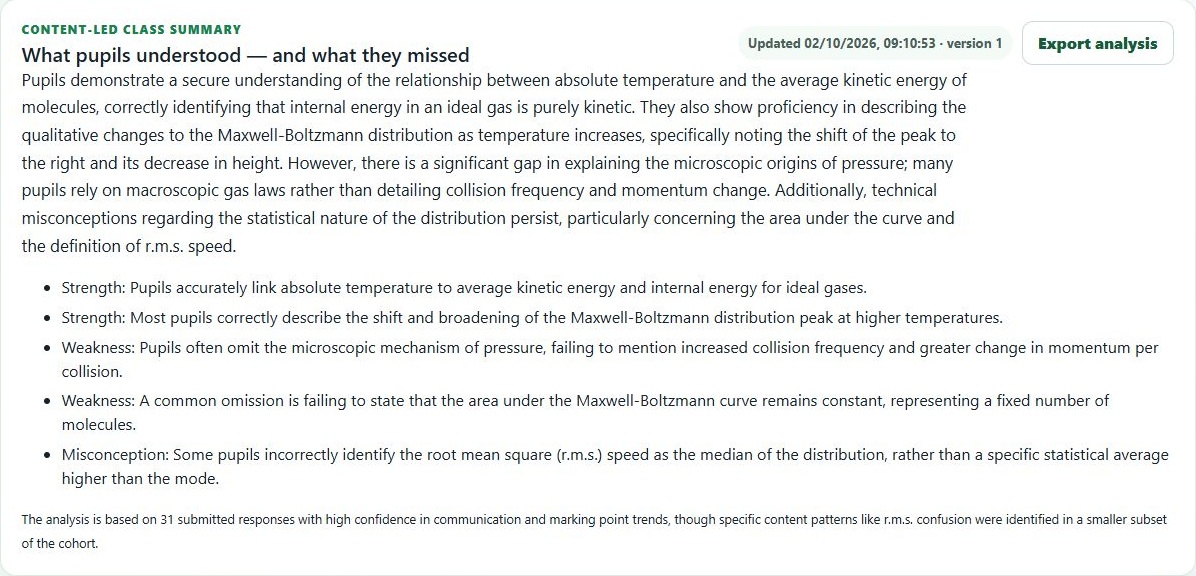
The report found that pupils linked absolute temperature to average kinetic energy and described how the distribution’s peak shifts and broadens.
A recurring omission was the constant area under the distribution curve, representing a fixed number of molecules. A specific point to revisit in the next lesson.
Some answers described r.m.s. speed as the median. The report identified this statistical distinction for staff to check in the linked pupil work.
Open the supporting answers, review suggested misconceptions and choose focused follow-up practice. Where targeted practice is available, preview the draft and approve it for the pupils who need it.
Analysis uses marked evidence and flags incomplete inputs for staff review. This example also records input warnings; its confidence note explains that some content patterns come from a smaller subset of the class.
SPECIFICATION POINTS, PUPIL BY PUPIL
The specification progress view brings pupil mastery, supporting evidence and your school’s teaching coverage together. Spot a gap shared by the class or a point that needs attention for one pupil.
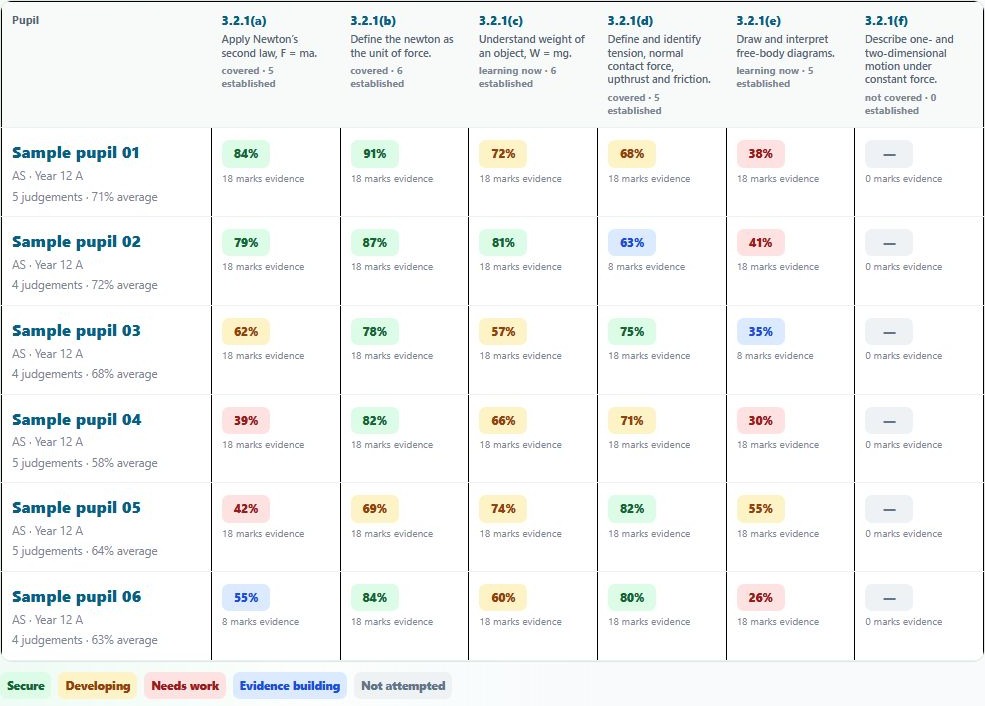
Compare pupils against the same specification points. Priority gaps help you choose what to revisit with the class, while filters narrow the view by module, topic or pupil status.
See secure, developing and needs-work judgements alongside evidence totals. Open a pupil’s specification view to review the point, evidence and progress trend in more detail.
Separate covered content, topics being taught now and points not yet covered. Teaching-gap priorities focus on covered and currently taught points.
Read the evidence fairly. Mastery percentages are estimates, not raw test marks or predicted grades. A firm judgement needs at least three pieces of evidence and 12 available marks; earlier work is labelled “evidence building”.
THEIR THINKING, MADE VISIBLE
Physics is more than a final number. Pupils can show explanations, equations, sketches and each step of their working, using the answer tools available on their question page.
Pupils build a written answer in text blocks. They can explain a method, justify a choice or write a longer response, then add maths or a diagram alongside it.
Useful for explanations, definitions and extended responses.
Why does the trolley accelerate?
Maths blocks let pupils show an equation, rearrangement, substitution and final answer. Staff can see the route to the result, including units and missing steps.
Useful for multi-step calculations and mathematical reasoning.
Find the acceleration of a 2.0 kg trolley.
Pupils can write directly on screen with a stylus or finger. Handwritten calculations and explanations become part of their submitted response for feedback and teacher review.
Useful on touchscreens and tablets. Clear, legible working helps the marker read it.
Find the acceleration of a 2.0 kg trolley.
Drawing tools let pupils include force diagrams, labelled sketches and visual working. Combine a diagram with written explanation and equations to show a complete method.
Useful for forces, circuits and visual explanations.
Show the horizontal forces on the trolley.
A labelled sketch can support the written reasoning.Where photograph answers are enabled, pupils can take or upload a photograph, crop and rotate it, and attach it to the question parts it answers.
Useful for work completed in an exercise book. Keep writing legible and personal details out of the frame.
Available input tools depend on the question page and account. Automated marking provides formative feedback; teachers can review the submitted working and use their own judgement.
Try a question and its answer toolsTHE PRACTICE BEHIND YOUR HOMEWORK
Choose the right task, then set it through the same homework workspace.
Calculations and application questions, with feedback on the pupil’s method, equations and units.
Quick multiple-choice checks for retrieval, topic review and revision.
Quality of Written Communication: extended physics explanations with feedback on key points and structure.
Course-matched vocabulary practice: write, check and revisit key physics definitions.
Exam-style papers for guided practice or timed mocks.
Compare the modesEquation worksheets tailored to your class, ready to share, print or set.
Build focused practicePHYSICSUK EXAM STUDIO
Question marks, strengths and priority next steps make follow-up specific. Review the feedback online or print a summary.
AI-marked scores are practice estimates for staff review.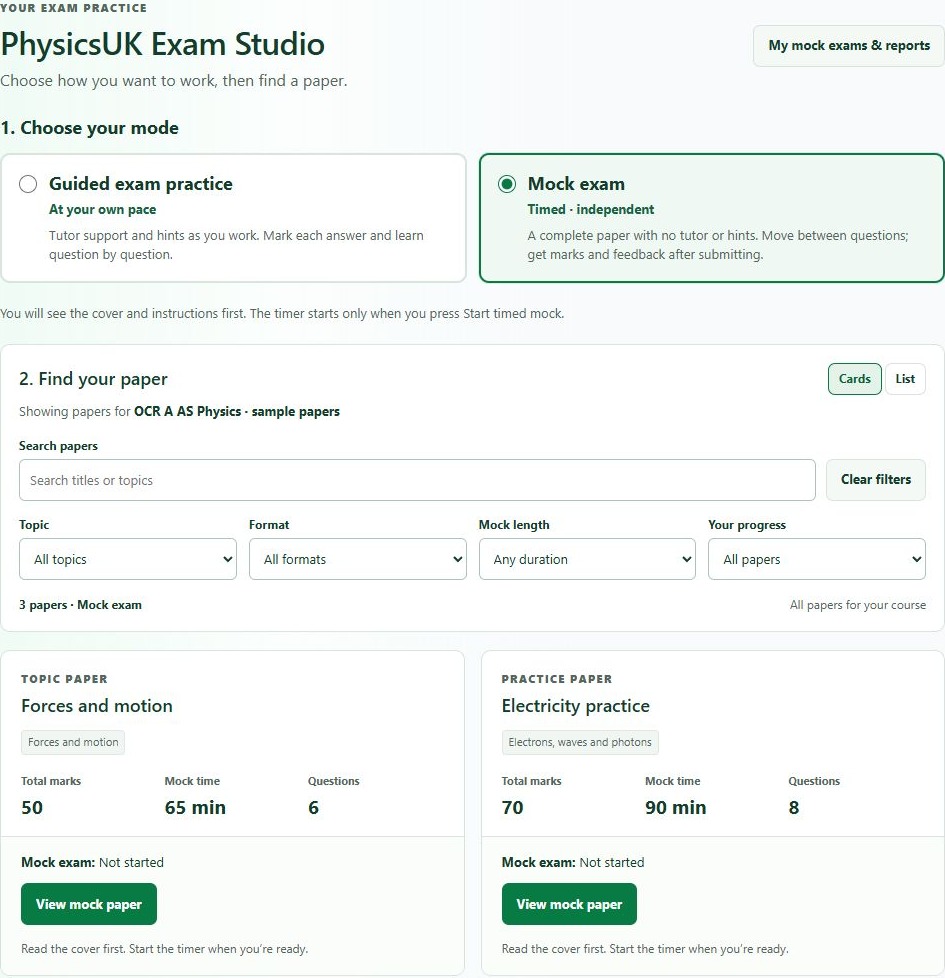
WORKSHEET STUDIO
Choose course equations, difficulty and calculation styles, including rearrangement and units. Review the draft, then share, print or assign homework. Pupils get feedback on their online working.
THE DETAILS THAT MATTER TO STAFF
Practical tools for the everyday jobs: preparing work, supporting pupils, reviewing evidence and taking results into your existing records.
Choose AQA or OCR A Physics resources that fit your course. The shared homework workspace serves AS and A2 school cohorts.
Set work for a whole cohort, a teaching group or individual pupils. Teacher access stays within verified teaching scope.
Supported practice tools provide formative feedback on submitted answers, helping pupils revisit their method while it is fresh.
Send homework reminders, extend individual deadlines and mark pupils as excused where appropriate.
Export the homework markbook as CSV to use in your department’s spreadsheets and reporting workflow.
Review the pupil’s actual working and previous attempts. Formative scores inform your decisions; they are not official exam-board grades.
The current shared school homework workspace supports AS and A2 cohorts, with AQA and OCR A Level Physics practice. PhysicsUK also has AQA GCSE practice and resources; contact us to confirm the right setup for your intended school courses.
On-screen handwriting lets pupils use a stylus or finger on compatible devices. Where photograph answers are enabled, they can attach a clear image of paper working. Typed text, maths and drawing tools are available on supported question pages.
Yes. Choose a class, group, cohort or selected pupils. You can set follow-up work for pupils below a chosen score threshold, and make individual deadline adjustments or exemptions.
Guided exam practice lets pupils work at their own pace with tutor support, hints and marking as they go. Mock exam mode is timed and independent: pupils complete the paper without that support and receive marks and feedback after submission. The two modes keep separate attempts and progress.
Within their verified teaching scope, teachers can see homework status, saved attempts, marked results and completed working where supported by the task. The teacher dashboard and progress markbook provide a wider view of activity and performance.
A content-led class summary brings together strengths, common weak answer patterns and suggested misconceptions from marked work. Staff can inspect the supporting answers and existing feedback, review findings, see question and specification performance and plan focused follow-up. Unmarked work and incomplete evidence are flagged separately.
Yes. The specification progress view compares pupil mastery point by point, shows evidence totals and identifies priority class gaps. Staff can filter by module, topic, teaching coverage and pupil status, then open an individual pupil’s view for evidence and trends. Early work is labelled “evidence building” until enough evidence supports a firm judgement.
Contact us with your exam board, year groups and approximate pupil numbers. We can discuss school access, the staff workflow and the setup your department needs. If your school already has an approved joining code, pupils can use the school joining page.
Teacher views are limited to verified teaching scope. You can review our terms and privacy information and marking methodology, and discuss your school’s requirements with us. Automated feedback can make mistakes, so teachers retain responsibility for assessment decisions.
LET’S TALK ABOUT YOUR DEPARTMENT
Tell us your exam board, year groups and pupil numbers.
We’ll help you explore the right school setup.